Best Pet Cameras 2026
2026 pet camera shootout - Furbo, Petcube, Wyze. We compare video quality, treat tossing, subscription fees, and whether any of them are actually worth it.
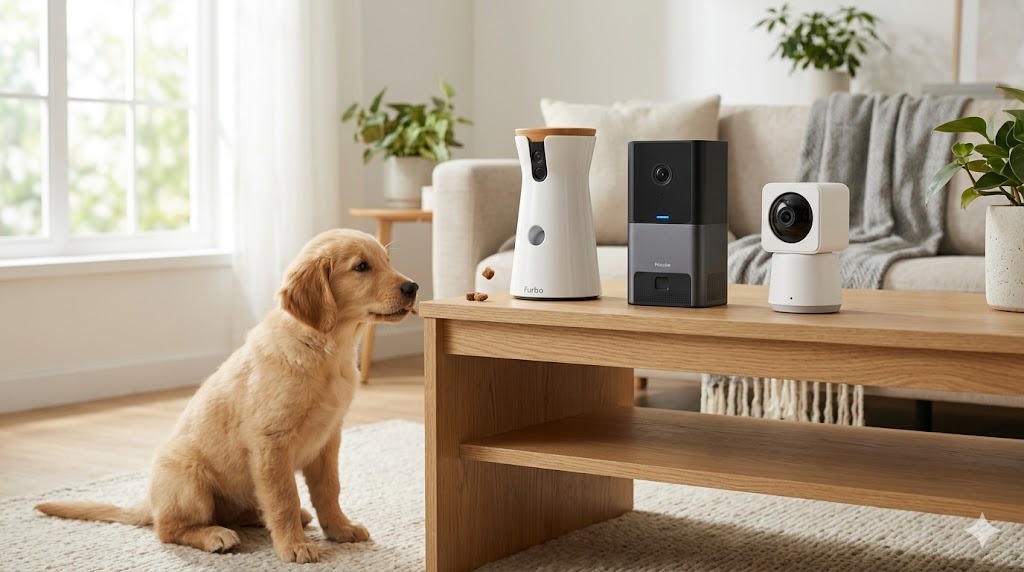
The best pet camera is a Furbo or Petcube if you genuinely want treat-tossing and pet-specific AI alerts, but a general-purpose Wyze or Eufy camera does the core job - watching your pet - for a fraction of the price. Decide whether you’ll actually use the treat dispenser before paying for it.
The pet camera market has matured into a clearer split: premium cameras with treat dispensers and AI alerts (Furbo, Petcube), versus general-purpose home cameras that work fine for pets at a fraction of the cost (Wyze, Eufy). The right pick depends entirely on whether you actually need the pet-specific features or whether you’ve been sold on them.
This guide tests the major options against the use cases that matter: separation anxiety monitoring, daytime check-ins, treat reinforcement, and reasonable alerts. We’ll also cover what to know about subscription pricing - which is where these products quietly extract most of their lifetime value.
What a Pet Camera Should Actually Do
Strip away the marketing and a pet camera serves four purposes:
- Live video check-in during the workday
- Two-way audio to reassure or redirect a pet
- Activity alerts (barking, person at door, pet has moved)
- Optional: treat dispensing for reinforcement
The first three are commoditized. Any modern $30 home camera does them adequately. The fourth - reliable treat dispensing - is where the premium pet cameras justify their cost, or fail to.
The Quick Verdict
- Best overall pet camera: Furbo Dog Camera 360°
- Best budget option: Wyze Cam v3 (or v4)
- Best for cats: Petcube Bites 2 Lite
- Best for serious behavior monitoring: Furbo Dog Nanny (subscription-tier features)
- Skip: “smart” cameras under $20 with no name brand - privacy and reliability concerns
Furbo Dog Camera 360°
Furbo’s flagship. 360° auto-tracking, full-HD video, two-way audio, and treat dispenser that flings small treats up to 10 feet. The auto-tracking is the standout feature - the camera physically rotates to follow your dog around the room.
What Furbo gets right
The auto-tracking is genuinely useful. Most pet cameras require you to manually pan, or accept that your pet will wander out of frame. Furbo’s motorized base keeps the dog centered.
Bark alerts that actually distinguish barking from other noises. Most generic cameras alert on any sound; Furbo’s algorithm has a much lower false-positive rate.
What Furbo gets wrong
The treat dispenser only works with specific treat shapes. Small round treats (Zuke’s Mini Naturals, similar) work; jerky strips and irregular shapes jam the mechanism. Plan to buy a specific treat shape if dispensing matters to you.
Subscription pricing is aggressive. Bark alerts, person detection, activity history, and most of the marketed AI features require Furbo Dog Nanny ($7-10/month). The hardware alone gives you a basic camera; the full experience requires recurring spend.
Petcube Bites 2 Lite
Petcube takes a similar approach: pet camera with treat dispensing. Less expensive than Furbo, with a more conservative design (no auto-tracking) and different software ecosystem.
What Petcube gets right
Treat capacity is generous. The Bites 2 Lite holds roughly 1.5 cups of treats, enough for several days of reinforcement.
The integration with vet telehealth is novel - Petcube subscriptions include access to a 24/7 vet chat for non-emergency questions. For some owners this alone is worth the subscription.
What Petcube gets wrong
Fixed wide-angle view means your pet sometimes hangs out at the edge of the frame, looking distorted. The lack of pan/tilt or auto-tracking is the biggest limitation versus Furbo.
The app, while functional, lags behind Furbo’s in polish and responsiveness.
Wyze Cam v4 (The Budget Option)
A general-purpose home security camera that happens to work well for pets at a tenth of the price of Furbo. No treat dispenser, no pet-specific AI - just reliable video, sound, and motion alerts.
When Wyze is the right pick
- You want to check on a pet that mostly sleeps during the day
- You don’t need treat dispensing
- You’re cost-conscious or you want to put cameras in multiple rooms
- You already use Wyze for home security
For most pet owners who realistically just want to peek in once or twice a day, a Wyze does 90% of what Furbo does for 20% of the price.
The Subscription Trap
All three brands push subscriptions hard. Here’s what you actually get for free vs. paid:
| Feature | Furbo Free | Furbo Subscription | Petcube Free | Petcube Subscription | Wyze Free | Wyze Subscription |
|---|---|---|---|---|---|---|
| Live view | Yes | Yes | Yes | Yes | Yes | Yes |
| Treat dispensing | Yes | Yes | Yes | Yes | N/A | N/A |
| Motion alerts | Limited | Yes | Limited | Yes | Yes | Enhanced |
| Bark alerts (AI) | No | Yes | No | Yes | No | No |
| Event history | None | 30 days | None | 30 days | 14 days | Unlimited |
| Cloud storage | None | Yes | None | Yes | None | Yes |
| Vet chat | No | No | No | Yes | No | No |
Lifetime cost matters. A Furbo at $230 + 5 years of Dog Nanny ($8/month) = $710. A Wyze at $40 + 5 years of basic use = $40. The Furbo is genuinely better; the question is whether the gap justifies $670.
Setup and Reliability
All three cameras share similar setup quirks:
- 2.4 GHz WiFi only. Most home routers default to 5 GHz for newer devices. You may need to enable a separate 2.4 GHz network or use a guest network.
- Power outlet required. No battery options in this category (battery cameras are made for security, not pet monitoring).
- WiFi range matters. Test camera location with your phone - if WiFi is poor where you want to mount the camera, the app will hang or disconnect.
Pet-Specific Use Cases
Separation anxiety monitoring
Furbo wins. The bark detection, motion detection, and auto-tracking together give you the best picture of how your dog is actually coping during your absence. Many trainers and behaviorists use Furbo for behavior assessment.
Casual workday check-ins
Wyze wins. You don’t need AI to confirm your cat is asleep on the back of the couch. Save the money.
Reinforcement training for separation
Petcube and Furbo win (they have treat dispensers). Use the camera to dispense a treat at calm moments to build positive associations with you-being-gone.
Multi-room coverage
Wyze wins by a lot. Three Wyze cameras cost less than one Furbo.
Cat-specific monitoring
Petcube Bites 2 Lite wins. Cats don’t reliably stay in one place, so treat dispensing is less useful. Petcube’s wider angle catches more of the room without auto-tracking artifacts.
What About Pawbo, Skymee, and Other Lesser Brands?
There are dozens of clones of the Furbo/Petcube design at $80-150 price points. They generally work, but with these caveats:
- App quality is hit-or-miss; some apps are abandoned after the device sells
- Cloud video storage often unclear or shut down with little warning
- Privacy practices unverified
- Long-term firmware updates rare
For most buyers, stick with Furbo, Petcube, or Wyze. The clones can save $50 upfront and cost much more in headaches.
Privacy and Security
These cameras send video to cloud servers. That’s how the live-view-from-anywhere feature works. The tradeoffs:
- All three companies have had documented security incidents at some point
- Storage of historical footage on company servers
- Always-on microphone in the home
For most pet owners, the privacy trade-off is acceptable. If it isn’t for you, the alternative is local-only solutions like Reolink with onboard storage and no cloud.
Frequently Asked Questions
Do pet cameras help with separation anxiety?
Sometimes. The camera itself doesn’t cure anxiety, but treat dispensing during calm moments can build positive associations with alone time. For severe anxiety, a veterinary behaviorist is needed - our common pet problems hub covers the training side.
Will my dog react to my voice through the camera?
Most dogs do, at least at first. Some find it confusing (hearing voice with no person) and the novelty wears off. Use sparingly.
Can pet cameras work without WiFi?
No. All current pet cameras require WiFi for connection to the app.
Is the treat dispenser worth it?
For most owners, yes - for the first few months. Long-term, many owners find they barely use it. If you’re cost-sensitive, start with Wyze and add treat dispensing later if you discover you need it.
Are there pet cameras with no subscription required?
Wyze is the closest. Basic features work without subscription. Furbo and Petcube are far less useful without subscription.
Can I see infrared/night vision?
All three have night vision. Furbo and Petcube offer color night vision in their current generations.
Do these work with Apple HomeKit?
Limited. Wyze has partial HomeKit support; Furbo and Petcube use their own ecosystems primarily.
Final Word
For most pet owners: Wyze Cam v4. You’ll save $200+ and get 90% of what most owners actually use a pet camera for.
For dog owners who want serious monitoring and treat reinforcement: Furbo 360° with the Dog Nanny subscription. Best in class for what it does.
For cat owners or owners who want middle-ground features: Petcube Bites 2 Lite, especially if you value the included vet chat subscription.
The pet camera market is increasingly commoditized at the low end and increasingly subscription-driven at the high end. Buy with eyes open about both.
Related Reading
Last updated: May 2026.